Connecting ESP8266 to WiFi Network – Beginners Guide


Connecting ESP8266 to WiFi Network – Beginners Guide


ESP8266 is the one of the most popular WiFi SoC (System on Chip) available today. It finds a lot of applications in IoT (Internet of Things), Home Automation fields. In this tutorial we will see how can we connect ESP8266 to a WiFi network.

Modes of Operation

ESP8266 has 3 operation modes. Those are:

  1. Station Mode
  2. Soft Access Point Mode
  3. Station + Access Point Mode

Station Mode:

Connecting to one specific network: ST  – Station mode in which ESP acts as a device & connects to an existing Access point.

The ESP8266 can communicate over WiFi in two different modes. It can connect to an existing wireless hot spot, or access point, similar to the way you connect your phone or computer to the Internet. This is called “station” mode. In station mode the ESP8266 board can reach out to the internet and may also communicate with other devices connected to the same network, including other ESP8266 modules.

Soft Access Point (Soft AP)

AP – Access Point mode where the ESP itself acts as AP & other devices like Mobile can connect to it.

Wi-Fi access points (AP) act as a hub for one or more stations (like your phone, or PC). An access point is connected to a wired network and often integrated with a router to provide access to stations connected to it to the Internet. If an access point is not connected to the Internet through a wired network, it is called a soft access point

ESP8266 module can operate as a soft access point (Soft AP) and support up to 5 Wi-Fi client devices, or stations, connected to it.

Station + Access Point Mode

The third mode of operation permits the module to act as both an AP and a STA. The mode of operation is set by the AT command.

Note: Read the article Getting Started with ESP8266 Programming – Arduino before following below steps.

Steps

  • Get your Routers SSID and Password
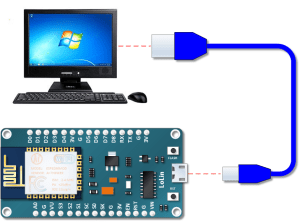
  • Connect your ESP8266 to your Computer
                                                Connect ESP8266 to Computer
Connect ESP8266 to Computer
  • Write the below code into Arduino IDE
#include "ESP8266WiFi.h"

// WiFi parameters to be configured
const char* ssid = "SERVER NAME";
const char* password = "SERVER PASSWORD";

void setup(void)
{ 
  Serial.begin(9600);
  // Connect to WiFi
  WiFi.begin(ssid, password);
  // while wifi not connected yet, print '.'
  // then after it connected, get out of the loop
  while (WiFi.status() != WL_CONNECTED) {
     delay(500);
     Serial.print(".");
  }
  //print a new line, then print WiFi connected and the IP address
  Serial.println("");
  Serial.println("WiFi connected");
  // Print the IP address
  Serial.println(WiFi.localIP());

}
void loop() {
  // Nothing
}
  • Save, Compile and Upload the code to ESP8266.
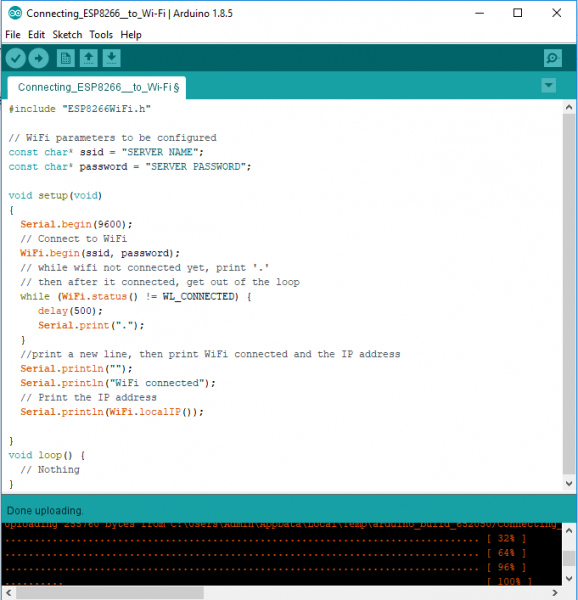
Connecting ESP8266 to WiFi
  • Verify The Output on the Serial Monitor
    • If ESP8266 is not connected then it will display “……” on Serial Monitor
    • If ESP8266 is connected then it will display ” WiFi connected and IP address” on Serial Monitor.

Result
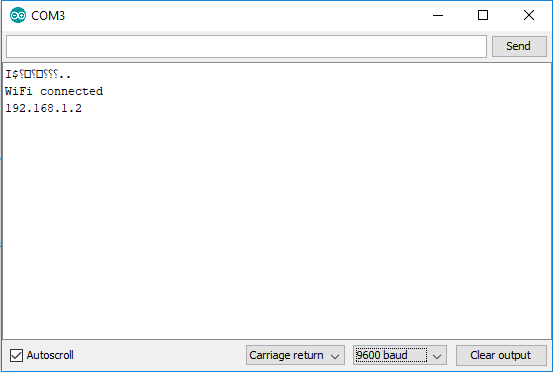
Connecting ESP8266 to Wi-Fi - Serial Monitor
Connecting ESP8266 to Wi-Fi – Serial Monitor

Comments

Popular posts from this blog

Using the TLP250 Isolated MOSFET Driver

Using the TLP250 Isolated MOSFET Driver - Explanation and Example Circuits I’ve already shown how to drive an N-channel MOSFET (or even an IGBT) in both high-side and low-side configurations in a multitude of ways. I’ve also explained the principles of driving the MOSFETs in these configurations. The dedicated drivers I’ve shown so far are the TC427 and IR2110. Some people have requested me to write up on MOSFET drive using the very popular TLP250. And I’ll explain that here. The TLP250, like any driver, has an input stage, an output stage and a power supply connection. What’s special about the TLP250 is that the TLP250 is an optically isolated driver, meaning that the input and output are “optically isolated”. The isolation is optical – the input stage is an LED and the receiving output stage is light sensitive (think “photodetector”). Before delving any further, let’s look at the pin configuration and the truth table. Fig. 1 - TLP250 Pin Configuration Fig....

SMPS DESIGN USING UC384X SERIES

 SMPS design is always a difficult task for most beginners even to many intermediate engineers based on the fact that the principle and the rules looks tedious. Flyback approach is always a very good concept when you needed a current not above KW but you can still use flyback approach to achieve a higher power rating if you can interconnect them together or follow some set rules. While I was getting my hands dirty, experimenting smps flyback approach I burnt a lot of IC and power transistors and other components before i was able to understand the principle revolving around it. SMPS design both buck converter, boost converter, buck-boost converter, push-pull, half-bridge and full bridge are not a difficult task but they need a very huge attention else nothing will work and debt may set in. Will be pointing out some rudiment behind SMPS design. Namely on buck converter using flyback approach: * TRANSFORMER SELECTION: Flyback uses a gapped ferrite core or gapped core, the core ca...

E-TECH SOLAR INVERTER SOLUTION

    DEEP CYCLE BATTERIES The reason many projects fail can mostly be put at the door step of batteries due to inadequate charging and low charge/discharge cycles. Our batteries are  among the very top 3 in the industry and capable of undergoing several cycle  of up to 5 years @ 20% DOD. Hence, we are confident of giving as much as 2 years warranty for some of our batteries SOLAR SYSTEM FOR DOMESTIC AND INDUSTRIAL USE  Many businesses such as hospitals, schools, shopping malls, hotels etc are beginning to embrace solar to completely eliminate unnecessary spending on diesels ……. why not come on board now and earn yourself some carbon credit apart from huge savings in millions of Naira.   SOLAR PANEL MODULES Our panels are carefully selected and tested from the very best among  the Tier one range of solar panels. We guarantee a sustainable yield for at least 25 years and 15 years warranty Inverter Our hybrid inverte...